CRM Software for Small Business: A Complete Guide to Managing Customers, Boosting Sales, and Growing Your Business

Running a small business involves managing multiple responsibilities, including customer communication, sales activities, marketing campaigns, lead generation, and daily operations. As a business grows, keeping track of customer information and managing relationships manually can become difficult. Spreadsheets, notebooks, and scattered emails often lead to missed follow-ups, lost inquiries, and inefficient communication.
To overcome these challenges, businesses are increasingly adopting digital management solutions. CRM software for small business is an effective tool that helps companies organize customer information, manage sales opportunities, automate repetitive tasks, and build stronger customer relationships.
Whether you operate a retail store, service company, consultancy, startup, or online business, the right CRM system can simplify daily activities and help you focus on business growth.
What Is CRM Software for Small Business?
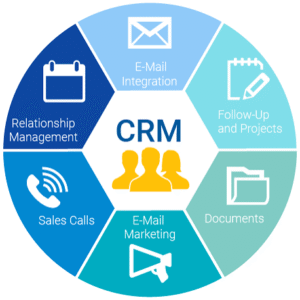
CRM software for small business is a digital platform designed to manage customer relationships and organize business interactions in one centralized location. CRM stands for Customer Relationship Management.
It allows businesses to store customer contact details, track inquiries, maintain communication records, manage sales pipelines, and monitor follow-up activities.
For example, when a potential customer contacts your business through a website, the CRM can record their information and help your sales team follow up. Employees can review previous conversations, understand customer requirements, and provide personalized assistance.
Instead of managing customer information across multiple spreadsheets and applications, everything can be organized through a single system.
Key Benefits of CRM Software for Small Businesses
1. Centralized Customer Information
Small businesses interact with customers through phone calls, emails, websites, social media, and face-to-face meetings. Managing information from different channels can become confusing.
CRM software stores important customer details, including names, contact information, purchase history, preferences, and previous conversations.
This makes it easier for employees to access accurate information whenever they communicate with customers. A centralized database also reduces the chances of losing important business records.
2. Better Lead Management
Finding potential customers is essential for business growth. However, generating leads is not enough; businesses must also track and convert those inquiries into paying customers.
CRM software helps collect leads from different sources and organize them according to their interests, requirements, and sales potential.
Business owners can monitor every lead, assign follow-up responsibilities, and identify opportunities that need immediate attention.
This organized approach improves sales management and helps businesses avoid missing valuable prospects.
3. Automated Follow-Ups and Reminders
Following up with customers at the right time can improve conversion rates and strengthen relationships. However, manually remembering every call, email, or meeting can be challenging.
CRM software allows businesses to schedule reminders and automate selected communication activities.
For example, employees can receive notifications about pending inquiries, upcoming meetings, quotation follow-ups, and customer requests.
Automation saves time, reduces repetitive administrative work, and ensures consistent communication.
4. Improved Customer Retention
Building long-term customer relationships is important for small businesses because repeat customers contribute to stable revenue and positive referrals.
CRM systems help businesses understand customer preferences, purchase patterns, and previous interactions.
Based on this information, companies can send personalized offers, share product updates, and provide relevant recommendations.
Regular engagement makes customers feel valued and encourages them to continue doing business with your company.
5. Increased Team Productivity
Small businesses often operate with limited employees, making efficient time management especially important.
CRM software helps teams organize tasks, assign responsibilities, track sales activities, and manage customer requests.
Instead of spending hours searching for information or updating multiple records, employees can access important details through one platform.
This improves collaboration and allows teams to focus on activities that directly support business growth.
Essential Features to Look for in Small Business CRM Software
Before selecting a CRM platform, business owners should identify the features that match their requirements.
Some important features include:
-
- Contact Management: Store and organize customer information in one place.
-
- Lead Management: Capture, categorize, and track potential customers.
-
- Sales Pipeline Management: Monitor opportunities from initial inquiry to successful closure.
-
- Task Management: Assign responsibilities and schedule important activities.
-
- Email Integration: Organize customer communication and follow-ups.
-
- Marketing Automation: Create targeted campaigns and improve customer engagement.
-
- Reports and Analytics: Monitor sales performance and customer activity.
-
- Mobile Accessibility: Access important business information from smartphones and tablets.
Choosing software with the right features helps small businesses improve efficiency without unnecessary complexity.
How CRM Software Helps Small Businesses Increase Revenue
CRM software can support business growth by improving lead conversion, customer engagement, and sales planning.
For example, businesses can identify which marketing channels generate the most inquiries and which products or services attract the highest customer interest.
Sales teams can also identify customers who have not purchased recently and contact them with relevant offers.
By analyzing customer information, businesses can make better marketing decisions, improve follow-up strategies, and discover opportunities for repeat sales.
How to Choose the Right CRM for Your Small Business
Selecting the right CRM requires understanding your business size, budget, customer management needs, and future growth plans.
Consider these factors before making a decision:
-
- Choose user-friendly software that requires minimal training.
-
- Look for features that match your daily business activities.
-
- Compare subscription pricing and available plans.
-
- Check whether the platform offers mobile access.
-
- Review data security and customer privacy features.
-
- Ensure that the software can scale as your business grows.
-
- Check the availability of reliable customer support.
It is also helpful to request a free trial or product demonstration before purchasing a subscription.
Conclusion
Managing customer relationships, sales inquiries, and daily business activities becomes more challenging as a small business grows. Manual processes can waste valuable time and create unnecessary administrative work.
CRM software for small business provides a centralized solution to organize customer information, manage leads, automate follow-ups, and improve sales performance. Whether you run a startup, retail shop, consultancy, or service-based company, the right CRM can help you deliver better customer experiences and improve operational efficiency.
Investing in suitable CRM software is a smart step toward building stronger customer relationships, increasing productivity, and achieving sustainable business growth.
